
Friday, December 18, 2009
No-SQL Databases - thanks to rise of Javascript
Server-side Javascript also dovetails nicely the new breed of NOSQL databases. Being web-native, these databases tend to communicate in HTTP, and in some cases JSON (JavaScript Object Notation) is the message format. Javascript libraries already include support for exactly that kind of interaction and programmers are familiar with them. Some of these NOSQL systems go beyond data persistence and into the zone of full-fledged Javascript application environments.

Tuesday, December 15, 2009
HyperOffice - SharePoint / MS Office like web tool
Source: http://www.readwriteweb.com/enterprise/2009/12/why-do-small-business-services.php
Collaboration services targeted for the small business market often seem more like software suites than web-based services with deep linking capabilities and tag-based environments. The portal mindset seems to have such a hold on the small business market.
HyperOffice feels monolithic - it provides the capability to create personal and group environments but extensions to the web are limited. In some respects this may be just the right approach. HyperOffice users may not want the capability to build data mashups and tie into services like Twitter.
The HyperOffice UI resembles a Microsoft Office environment. The main page includes icons such as desktop, mail and calendar.

The features are basic but provide a clear functionality for the user. HyperOffice has personal and group settings. Groups may share calendar items, collaborate on documents and other tasks. Additional features include tasks, notes, a wiki and the ability to search Google and Yahoo! from within the application.
Everything - Fastest Search Engine
http://www.voidtools.com
How long will it take to index my files?
"Everything" only uses file and folder names and generally takes a few seconds to build it's database.
A fresh install of Windows XP SP2 (about 20,000 files) will take about 1 second to index.
1,000,000 files will take about 1 minute.
Friday, December 11, 2009
How To Browse Only the Unread Messages
Tip from: http://www.dailyblogtips.com/gmail-tip-how-to-browse-only-the-unread-messages/
If you have tons of unread messages, or as in my case if there are some messages which you marked as unread to be read later and now those messages are buried deep under pages and pages of "read" messages, you would have to run through all the previous pages in order to find those unread messages.
There's a better way to do this:
Search for "label:unread" on the Gmail search box, this will filter only the unread messages.
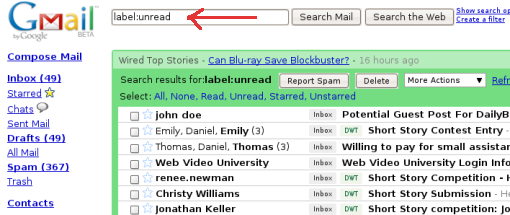
You can also use "label:unread label:MY_LABEL" in the search box to search through only unread messages in MY_LABEL
Wednesday, December 9, 2009
Google Real-Time Search Live Now (Video, Links)
Google Real-Time Search Live Now (from ReadWriteWeb)
This is what I saw in the morning and pointed out in my previous post ...
This is what I saw in the morning and pointed out in my previous post ...
Tuesday, December 8, 2009
Google.com experiments Search results layout

for one particular site have an inbuilt scrollbar with the results
scrolling continuously for that site.
Innovative way of presenting 'detailed results' for one site that
satisfies the search terms requirement more 'deeply' than others.
Friday, December 4, 2009
Gboard, a keyboard just for Gmail users
Gboard, a keyboard just for Gmail users

The Gboard has 19 buttons and each corresponds with a task in Gmail. From the board, you can search, go to results, go to starred mail, compose a message, reply, reply to all, forward a message, star and archive messages, delete and mark messages as spam, flip through your messages (and within message threads themselves), select messages and go right to the inbox.
Subscribe to:
Posts (Atom)